
Many people use the internet every single day, but few actually stop to ask, how does the internet work? We send messages, watch videos, shop online, and search for answers without thinking about what makes it all possible.
Knowing how the internet works helps you understand what happens behind the screen and how your data travels around the world. This article explains the internet, including its function, how it connects millions of devices, how data moves, and what keeps it running.
Table of Contents
What is the Internet?
The internet is a global network that connects millions of computers and devices. It lets people share information, send messages, watch videos, and use apps no matter where they are.
Many people confuse the internet with the web. The web is just one part of the internet — it includes websites and web pages. The internet is much bigger and also carries emails, apps, games, and files.
Think of the internet like a giant highway system. Your messages, videos, and files are like cars travelling on these highways, moving from one place to another to reach you or someone else.
Brief History of Internet
The internet started in the late 1960s with a project called ARPANET. It was a way for computers to share information over long distances. Back then, only a few universities and research centers could use it.
Over the years, the internet grew fast. Email became popular in the 1970s and 1980s, making communication much easier. In 1991, the World Wide Web was invented, allowing people to visit websites. Later, broadband made the internet faster, and mobile internet let us connect from phones and tablets.
Knowing this history helps us understand how the internet works today. Every email we send, video we watch, or website we visit is built on this long chain of technology and improvements.
Main Components of Internet
The internet works because of several key parts. Let’s look at them one by one:
- Servers – These are powerful computers where websites, apps, and data live. When you visit a website, your device connects to a server to get the information.
- Clients – These are the devices you use, like computers, phones, or tablets. They request and receive data from servers.
- Routers & Switches – These act like traffic managers. They guide data from one device to another, making sure it reaches the right place.
- Cables & Satellites – Most internet data travels through cables under the ground or under the sea. Satellites help send internet signals to remote areas.
- Protocols – These are rules that devices follow to communicate. Examples are TCP/IP, which moves data safely, and HTTP, which loads websites.
Each part works together to make the internet fast, reliable, and available almost everywhere.
How Does the Internet Actually Work?
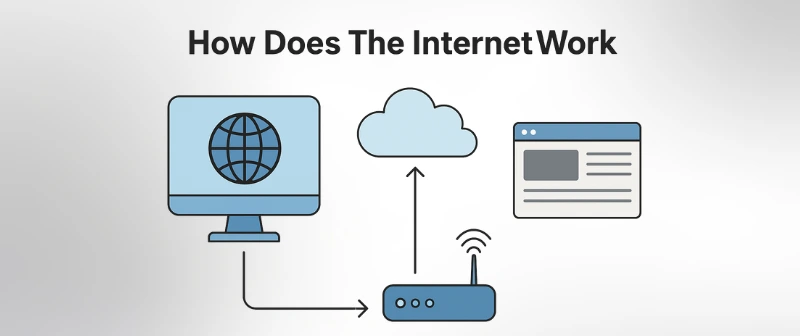
The internet may seem like magic, but it works in clear steps:
- You enter a web address – When you type a website in your browser, your device starts looking for it.
- DNS finds the IP address – The Domain Name System (DNS) translates the website name into a number called an IP address, which tells your device where to find the site.
- Request goes through your ISP – Your Internet Service Provider (ISP) sends the request to the right place on the internet.
- Data travels via routers and cables – The request moves through many routers and cables, jumping from one network to another.
- Server processes and sends back data – The website’s server receives your request, finds the information, and sends it back in small packets.
- Your browser displays the content – Your device collects all packets and shows the website on your screen.
It all happens in seconds, letting you browse, watch, or shop online instantly.
Role of IP Addresses
An IP address is a unique number that identifies every device on the internet. It works like a home address, letting data know exactly where to go.
There are two main types:
- IPv4 – The older version, uses numbers like 192.168.1.1.
- IPv6 – The newer version, created because we needed more addresses. It looks longer, like 2001:0db8:85a3:0000:0000:8a2e:0370:7334.
IP addresses can be public or private:
- Public IP – Used to connect your device to the internet.
- Private IP – Used inside your home or office network.
IP addresses help devices find each other. When you send a message or visit a website, your IP shows where the data should go and where it should come back.
Data Transmission: Packets and Protocols
When you send or receive information on the internet, it does not travel as one big file. It is broken into small pieces called data packets. Each packet moves separately and may take different paths to reach its destination.
Once all packets arrive, your device reassembles them into the original message, image, or video. This is why even large files can travel quickly across the internet.
The internet follows rules called protocols to make sure data moves correctly. The most important is TCP/IP:
- TCP (Transmission Control Protocol) – Makes sure all packets arrive and are in the right order.
- IP (Internet Protocol) – Shows where each packet should go, like an address on a letter.
Together, TCP/IP ensures your data travels safely and reaches the right device.
Wired vs Wireless Internet
The internet can reach your devices in two main ways: wired and wireless.
Wired Internet uses physical cables to connect devices:
- Fiber optics – Fast and reliable, sends data using light signals.
- Ethernet cables – Common in homes and offices, stable connection.
Wireless Internet uses radio signals to connect devices without cables:
- Wi-Fi – Works in homes, cafes, and offices. Easy to connect multiple devices.
- 4G/5G mobile internet – Connects phones and tablets anywhere there is network coverage.
Pros and cons:
- Wired – Very fast and stable, but devices must stay near cables.
- Wireless – Convenient and flexible, but speed and reliability can drop with distance or interference.
Both types work together to give us fast and accessible internet everywhere.
Who Controls the Internet?
Many people think one company or person owns the internet. That’s not true. The internet is a global network, and no single entity controls it.
Some organizations manage its rules and standards:
- ICANN – Controls domain names and IP addresses.
- IETF – Creates technical rules for how data moves.
- W3C – Sets rules for websites and web standards.
ISPs (Internet Service Providers) connect homes and businesses to the internet. They help deliver data but don’t own the internet.
Together, these organizations and ISPs keep the internet running smoothly for everyone.
Security on the Internet
The internet is useful, but it can be risky without protection. Encryption, like HTTPS, keeps your data safe when you browse websites.
Other tools that protect you:
- Firewalls – Block unwanted access to your device.
- VPNs – Hide your location and encrypt your data.
- Secure communication apps – Keep messages private.
Still, risks exist. Hackers, phishing scams, and malware can steal information or harm devices. Using security tools helps you stay safe online.
Future of the Internet
The internet keeps evolving. Some big trends are:
- Internet of Things (IoT) – Devices like fridges, cars, and watches connect to the internet.
- AI integration – Smart tools and assistants will make the internet more helpful.
- Space-based internet – Satellites like Starlink bring the internet to remote areas.
In the next decade, the internet will become faster, smarter, and more connected than ever.
Conclusion
So guys, in this guide we have covered all the working steps on how the internet works. From servers and IP addresses to data packets and wireless connections, you now know how information travels across the world in seconds. My personal recommendation: Always stay curious about the internet and use it safely. Understanding how it works helps you make better choices online.
Goodbye for now! Check out the FAQs below to clear any remaining questions about the internet.
FAQs
Here are some of the most commonly asked questions related to “How Does the Internet Work?”:
1. Is the internet the same as Wi-Fi?
No, they are not the same. The internet is a global network of computers and servers. Wi-Fi is a way to connect devices to the internet without cables. You can use Wi-Fi at home, cafes, or offices. It only gives access; it is not the internet itself.
2. How fast does internet data travel?
Internet data travels very fast, almost at the speed of light in cables. Fiber-optic cables are the fastest. Wireless data like Wi-Fi or 4G is slightly slower. Speed depends on your connection type and network traffic.
3. Can the internet ever be turned off?
The internet cannot be turned off completely. It is made of millions of networks worldwide. Some parts may go down temporarily due to issues or maintenance. But the whole internet keeps running globally.
4. Who invented the internet?
The internet started with a project called ARPANET in the 1960s. It was created by scientists and engineers in the U.S. Many people contributed over time. No single person invented it alone.
5. What happens if DNS servers fail?
DNS servers translate website names into IP addresses. If they fail, your browser cannot find websites. You might see an error or a “website not found” message. Other DNS servers can take over to keep websites accessible.
6. How do websites get on the internet?
Websites are stored on servers. You register a domain name for your website. Then, the server connects to the internet so people can visit it. Your website becomes accessible worldwide.
7. What’s the difference between an IP and a URL?
A URL is the website name you type in a browser, like example.com. An IP address is a number that shows where the website lives. DNS translates the URL into the IP so your device can find the server. Both are needed to visit a website.